 Feny
Your time in one calendar
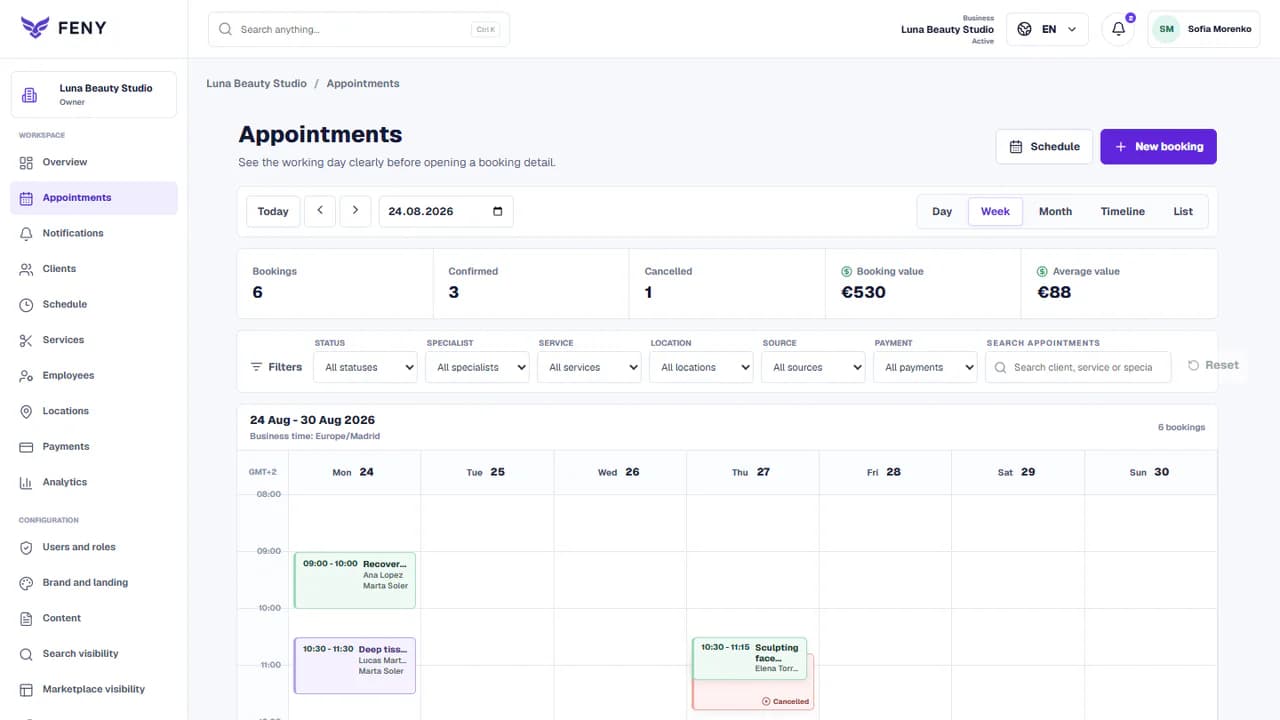
View online bookings and enter appointments agreed by phone. Adjust working hours and absences to publish accurate availability.
Feny · Online booking solutions
Working independently also means managing your diary. Feny brings together services, availability and appointments so clients can choose a time while you are serving someone else.
Starter: 2 months free, no card required.
Included in Starter: up to 3 team members, 25 active services and 1 location.
Built around your daily work
View online bookings and enter appointments agreed by phone. Adjust working hours and absences to publish accurate availability.
Show duration, price and meeting location. Separate an initial consultation from a follow-up so each appointment reserves the time it needs.
Publish your booking page and share it from your website or social profile. Clients can check times outside your working day, under your configured rules.
A practical example
You offer a 45-minute first consultation and a 30-minute follow-up. Configure both services and your working hours. The client selects a service and sees available times that fit its duration.
The confirmed booking appears in your diary with the service and contact details. You can keep working without negotiating every time slot by message.
Add your real services, team and working hours. Review the client journey before publishing.
Read the guideCreate your business and add the services you provide personally. Review prices, currency, duration and contact details before publishing.
Assign services to your professional profile and configure working hours, breaks and absences. Set booking lead time and rules for appointment changes.
Book from a phone, check the appointment in your calendar and try cancelling it. Then share the link with your clients.
No. You can set up a business with one professional. Compare the current plan limits and terms before choosing a subscription.
Yes. Record phone appointments in Feny so your calendar reflects your actual workload. A call or message alone does not reserve a time.
They depend on the payment methods, channels and rules you connect and configure. Review each provider’s terms and test the flow before offering it to clients.
POSSIBILITIES
Find your business and the everyday scheduling tasks Feny can help with. Explore services, team calendars and the path from enquiry to appointment.
30 of 30 business types
Organize salon appointments, hairdressing services and staff schedules with Feny. Create a booking website and start with 2 months of Starter, without a card.
Learn more
Run a barbershop appointment calendar with Feny. Offer haircuts, beard services and barber selection on your own booking page. Try Starter for 2 months.
Learn more
Manage beauty appointments, treatments and specialists with Feny. Give clients a clear booking page for nails, brows and facial services.
Learn more
Organize massage appointments, session lengths and therapist availability with Feny. Create a booking page for your massage or wellness practice.
Learn more
Manage personal training appointments and trainer availability with Feny. Publish your sessions, location and booking link for individual clients.
Learn more
Organize spa treatments, therapists and treatment rooms with Feny. Build your booking page and check availability before confirming a visit.
Learn more
Organize veterinary visits, vaccinations and follow-ups in Feny. Let owners choose a service, vet and available time.
Learn more
Offer planned consultations online, organize doctors’ schedules and keep reception bookings in one calendar with Feny.
Learn more
Manage dental consultations, hygiene appointments and follow-ups with Feny. Match each visit to a dentist and the time it needs.
Learn moreOrganize assessments, therapy sessions and return visits in Feny. Keep specialist hours and appointment durations clear.
Learn moreOffer consultation times, manage session lengths and organize return appointments in Feny with a clear public booking page.
Learn more
Schedule legal consultations, document discussions and return meetings in Feny. Share available times instead of arranging every visit by phone.
Learn more
Organize accounting consultations, document handovers and reporting meetings in Feny. Give each client a clear appointment time.
Learn moreTurn discovery calls, advisory sessions and project reviews into bookable services with Feny. Organize your own schedule or a team’s.
Learn morePublish introductory and individual lessons, organize teaching hours and plan return visits with students using Feny.
Learn more
Schedule level assessments, private language lessons and consultations in Feny. Show the right teacher, location and available time.
Learn moreOffer hourly bicycle rental in Feny with duration tariffs, quantities and resource availability. Record handover and partial or full returns.
Learn more
Book bicycle diagnostics, maintenance and collection appointments in Feny. Keep workshop intake and mechanics’ time organized.
Learn moreOrganize vehicle diagnostics, tyre appointments, maintenance and detailing visits in Feny with clear service times and staff schedules.
Learn more
Arrange device diagnostics, repair intake and collection in Feny. Keep customer visits and technician availability in one place.
Learn moreOrganize visits by electricians, plumbers and home repair specialists in Feny. Publish consultations and service appointments with clear durations.
Learn moreArrange cleaning assessments, regular visits and team schedules in Feny. Let customers choose an appropriate service and time.
Learn more
Organize grooming, coat care and introductory appointments in Feny. Match each visit to the groomer and the time required.
Learn moreBook portrait sessions, planning meetings and studio appointments in Feny. Keep shooting time, preparation and locations clear.
Learn more
Organize property viewings, valuation meetings and client consultations in Feny. Coordinate agents and available appointment times.
Learn moreSchedule tattoo consultations, design discussions and defined studio appointments with Feny. Give clients a clear first step.
Learn moreOrganize individual sessions and scheduled classes in Feny. Make instructor hours, locations and class capacity clear to clients.
Learn moreManage hourly equipment rental in Feny: duration tariffs, quantities, extras and availability. Keep handover and return history with the order.
Learn moreSchedule venue visits, planning consultations and supplier meetings in Feny. Give clients a clear way to arrange the next discussion.
Learn moreOffer your own services, appointment durations and available times in Feny. Build a booking page around the way your business works.
Learn moreStarter: 2 months free, no card required.
Create my businessReview current plan limits and terms before publishing. Compare plans →